Midjourney Portrait Prompts: 11 That Actually Work
11 Midjourney portrait prompts that work in 2026 — copy-paste them, then learn the lens, lighting, and stylize choices that make a portrait look real.
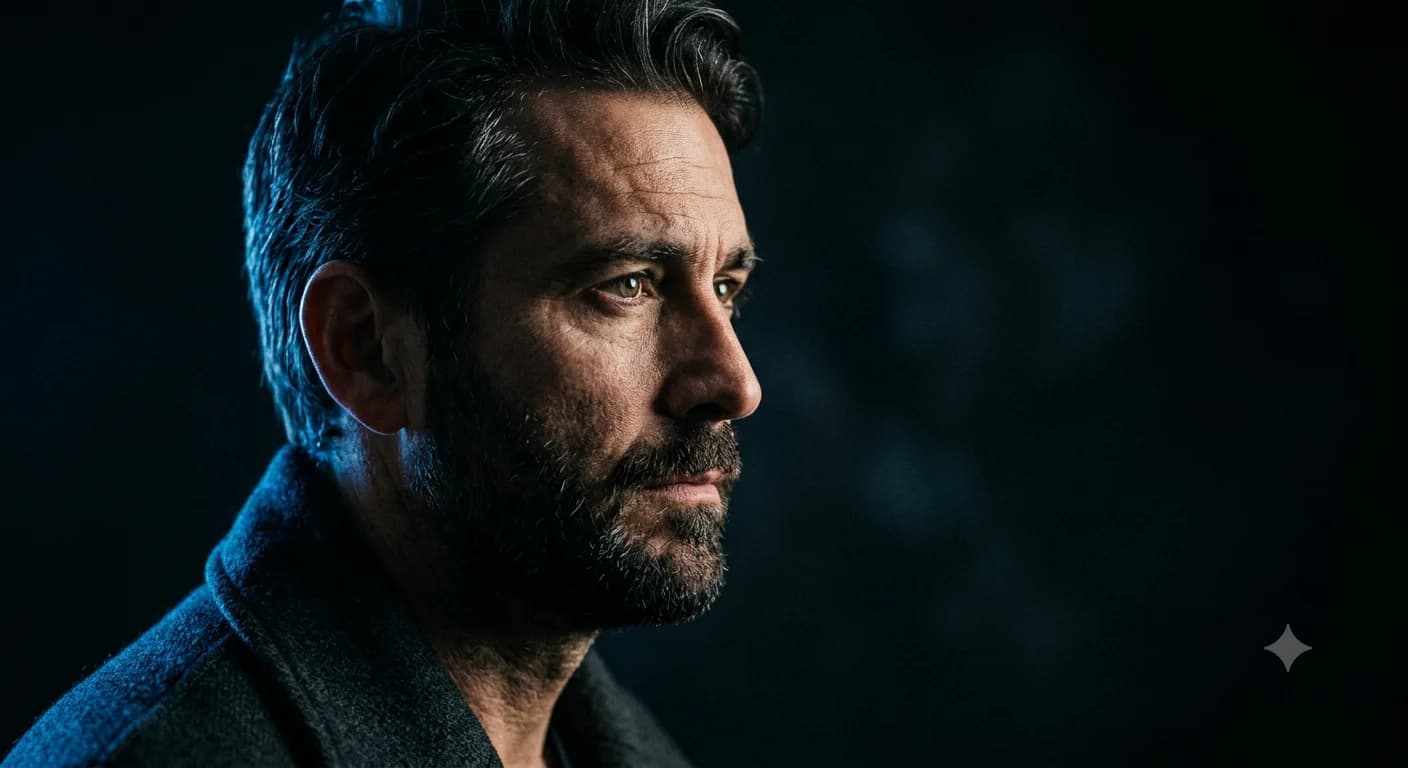
Midjourney portrait prompts live or die on three choices: lens, lighting, and expression. Get those right and the model gives you a person who looks photographed, not generated. Get them vague and you get the default Midjourney face — over-smoothed, over-lit, plastic.
Below are 11 portrait prompts you can copy-paste right now, each with the why behind it and a one-line tweak to make it yours. Then the part that matters more than any single prompt: the lens-lighting-expression logic so you can build your own.
Table of contents
- What makes a portrait prompt work
- The portrait formula
- 11 Midjourney portrait prompts that work
- Realism with --style raw and stylize sweet spots
- Fixing skin, eyes, and hands
- Adapt a prompt to your subject
- Frequently asked questions
What makes a portrait prompt work
The best Midjourney portrait prompts all share one trait: they treat a portrait as a triad. Lens controls how the face is rendered and how the background falls away, lighting sets the mood and the shape of the face, and expression carries the emotion. Miss one and the image feels off even when you can't say why.
This is real portrait photography language, and Midjourney understands it. Naming an "85mm lens" pulls the model toward portrait-typical compression and shallow depth of field. Naming "Rembrandt lighting" gives you that triangle of light on the cheek. You're not decorating the prompt — you're directing the camera.
🧠 Remember:
Every strong portrait prompt names three things: a lens, a lighting pattern, and an expression. Skip one and the model fills it with its default — which is exactly where the generic "AI face" look comes from.
The portrait formula
Here's the triad as a quick-reference. Mix and match a lens, a lighting pattern, and an expression to dial a mood.
| Lens | Best for | Lighting pattern | Mood it sets |
|---|---|---|---|
| 85mm | Classic portrait, flattering | Rembrandt | Timeless, dramatic |
| 135mm | Tight headshot, compressed | Butterfly | Polished, beauty |
| 50mm | Environmental, natural | Soft window light | Honest, candid |
| 35mm | Editorial, context | Split light | Edgy, narrative |
The base formula behind every prompt below: [subject + expression], [shot type], [lens], [lighting], [background] --ar 4:5 --style raw --s [100-250]. It's the 5-part prompt structure tuned for faces.
11 Midjourney portrait prompts that work
Copy, run, then use the "modify" line to make it yours. All use --ar 4:5 (portrait crop) and --style raw for realism.
1. Classic headshot
a confident woman in her 40s, gentle smile, head-and-shoulders portrait,
85mm lens, soft window light from the left, neutral grey background
--ar 4:5 --style raw --s 150
Why: 85mm + soft side light is the dependable, flattering baseline. Modify: swap "neutral grey" for a warm interior to soften it.
2. Environmental portrait
a ceramicist at her wheel, focused expression, half-body environmental
portrait, 50mm lens, natural light from a studio window, clay-dusted
workshop behind her --ar 4:5 --style raw --s 175
Why: 50mm keeps the context legible — the room tells the story. Modify: change the trade to fit your subject.
3. Cinematic portrait
a man gazing off-frame, pensive, cinematic portrait, 85mm lens, moody
low-key lighting with a cool rim light, shallow depth of field, dark
background --ar 4:5 --style raw --s 200
Why: rim light separates the subject from a dark background — instant film-still feel. Modify: warm the rim light for a different emotional register.
4. Studio beauty
a young woman, serene, beauty close-up, 135mm lens, butterfly lighting,
flawless soft shadows, seamless white background --ar 4:5 --style raw --s 120
Why: butterfly lighting + 135mm is the magazine-cover combo. Modify: add "natural skin texture" to dial back the polish.
5. Editorial portrait
a fashion model, strong direct gaze, editorial portrait, 35mm lens,
split lighting, bold colored gel background --ar 4:5 --style raw --s 250
Why: split light + a gel background reads high-fashion and narrative. Modify: change the gel color to reset the whole mood.
6. Candid portrait
an older man laughing, genuine candid moment, 50mm lens, warm golden
hour backlight, blurred street background --ar 4:5 --style raw --s 175
Why: golden-hour backlight + a real expression beats any posed shot. Modify: swap the street for a park or cafe.
7. Low-key dramatic
a stern-faced chef, low-key dramatic portrait, 85mm lens, single hard
key light, deep shadows, near-black background --ar 4:5 --style raw --s 200
Why: one hard light and deep shadow is pure drama and texture. Modify: soften the key for a gentler character study.
8. High-key bright
a smiling child, high-key bright portrait, 85mm lens, even soft
lighting, airy white background, cheerful --ar 4:5 --style raw --s 130
Why: high-key reads clean, optimistic, commercial. Modify: great template for product-adjacent lifestyle shots.
9. Character / fantasy
a weathered elven ranger, intense expression, fantasy character portrait,
85mm lens, dappled forest light, mossy background, intricate leather armor
--ar 4:5 --style raw --s 300
Why: a touch more stylize (--s 300) suits fantasy without going painterly. Modify: this pairs perfectly with a locked reference for a recurring character.
10. Black and white
a jazz musician, eyes closed mid-performance, black and white portrait,
85mm lens, dramatic side light, rich tonal contrast --ar 4:5 --style raw --s 180
Why: monochrome forces you to nail light and expression — no color to lean on. Modify: add "film grain" for analog texture.
11. Close-up detail
extreme close-up of an elderly woman's face, every wrinkle and pore,
100mm macro lens, soft directional light, natural skin texture
--ar 4:5 --style raw --s 100
Why: low stylize + "natural skin texture" defeats the plastic-skin default. Modify: the realism trick here works on any portrait.
Lens, lighting pattern, expression, stylize value, anatomy control — every portrait balances five moving choices, and the right mix changes per look. Suvio makes those choices for you from a plain description.
Realism with --style raw and stylize sweet spots
Two parameters carry the realism in most Midjourney portrait prompts. Midjourney beautifies by default; --style raw turns that down so the model follows your words instead of its taste — non-negotiable for realistic portraits.
Then stylize. For faces, the pocket is --s 100–250. Below 100, portraits go flat and lifeless; above 500, they drift painterly and lose photographic credibility. When in doubt, --s 150.
💡 Pro Tip:
The realism combo most Midjourney portrait prompts miss: --style raw --s 130 plus "natural skin texture, catch lights in the eyes" in the prompt. Raw kills the beautification, low stylize keeps it photographic, and those two phrases fix the dead-eyes-and-plastic-skin tell in one shot.
Fixing skin, eyes, and hands
V8.1 is much better at anatomy than older versions, but portraits still expose the weak spots. Three targeted fixes:
- Eyes — specify "catch lights in the eyes." Lifeless eyes are usually missing that reflection; naming it brings the face alive.
- Skin — add "natural skin texture, visible pores." This is the single best counter to the plastic-skin default.
- Hands — keep hand positions simple and natural in the prompt; if fingers still misbehave, add
--no extra fingers, deformed hands. The full mechanics are in the Midjourney negative prompts guide.
⚠️ Watch Out:
Don't reflexively stack --no deformed hands, bad anatomy, ugly on every portrait — over-negating can stiffen the pose and flatten the expression. V8.1 handles faces well by default; reach for negatives only when a specific flaw actually shows up.
Adapt a prompt to your subject
The 11 Midjourney portrait prompts above are starting points, not endpoints. To adapt any of them: keep the lens-lighting-expression skeleton, swap the subject and setting, and hold the parameters. Want the cinematic look on your own subject? Keep "85mm, low-key, cool rim light, dark background," change the person.
For a recurring subject across many portraits, pair these prompts with a Midjourney consistent character reference so the face stays the same shoot to shoot. And the broader craft — structure, parameters, negatives — starts at the complete guide to AI prompt engineering.
⚡ Try This:
Take prompt #1 (the classic headshot) and run it three times, changing only the lens: 50mm, 85mm, 135mm. Same face, same light — watch how the background compression and framing shift. That single experiment teaches you more about lenses than any chart.
The shortcut. Building a portrait prompt means balancing lens, lighting, expression, stylize, and anatomy — and each combination shifts with the look you're after. Suvio lets you describe the portrait you want and returns a prompt with those choices already made. See real before/after examples in the gallery, or get prompts tuned for the latest Midjourney.
Frequently asked questions
What makes good Midjourney portrait prompts?
Three named choices: a lens (85mm for classic portraits), a lighting pattern (Rembrandt, butterfly, split), and an expression. Add --style raw and --s 100–250 for realism. Vague prompts get the generic over-smoothed AI face; specific ones get a photographed look.
What stylize value is best for portraits?
--s 100–250, with --s 150 as a reliable default. Below 100 portraits look flat; above 500 they turn painterly and lose photographic realism. Always pair it with --style raw.
How do I fix plastic-looking skin in Midjourney portraits?
Add "natural skin texture, visible pores" to the prompt, use --style raw, and keep stylize low (--s 100–150). The default beautification is what causes plastic skin; these three together counter it.
How do I get realistic eyes in a portrait? Specify "catch lights in the eyes." Lifeless AI eyes are usually missing that small reflection; naming it adds the spark that makes a face feel alive.
Can I keep the same face across multiple portrait prompts?
Yes — pair your portrait prompt with a character reference (--oref on V7) so the same face carries across shots. The full version-aware workflow is in the consistent-character guide.
Keep reading
Midjourney Prompt Structure: A 5-Part Formula
A repeatable Midjourney prompt structure — the 5-part formula that turns a blank box into the on-target image you pictured, with a before/after for each part.
Midjourney Parameters Cheat Sheet: Complete 2026 V8
This Midjourney parameters cheat sheet covers every flag — --ar, --stylize, --chaos, --sref — with V8 defaults, version compatibility, and visuals.
Midjourney Negative Prompts: Fix 8 Common Errors
Midjourney negative prompts, done right. Learn how --no really works, why it backfires, and the 8 fixes for bad hands, text, and clutter that actually hold up.