Midjourney Consistent Character: 6-Step --cref Guide
Midjourney consistent character, solved: a 6-step workflow to stop face drift across scenes, the weight values that lock the face, and what works on V7 vs V8.1.
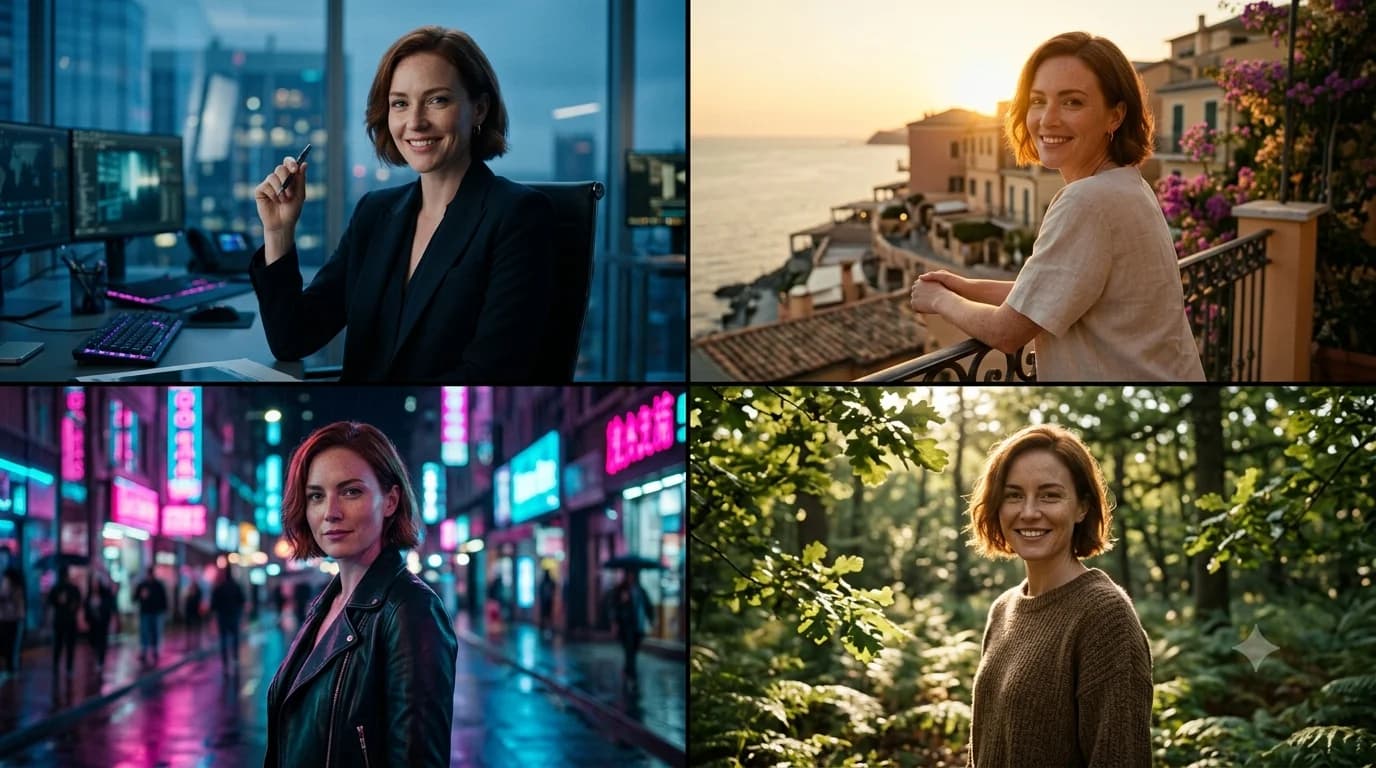
A Midjourney consistent character is the thing that turns single images into a story — the same face across a comic, a brand mascot that stays on-model, a protagonist who looks like themselves in every scene. It's also the single hardest thing to pull off, because the model has no memory: every generation starts from scratch, so "the same person" drifts into a cousin, then a stranger.
This guide fixes drift with a 6-step workflow — and it's honest about versions, because the right tool depends on which Midjourney model you're on. Some character flags are V7-only; none are native to V8.1 yet. Here's what actually works right now.
Table of contents
- Why characters drift
- --cref vs --oref: which version, which tool
- A 6-step Midjourney consistent character workflow
- The --cw value guide
- Multi-image character sets
- Troubleshooting drift
- Frequently asked questions
Why characters drift
Generative models don't remember anything between jobs. When you type "the same woman from before," the model has no "before" — it just generates a plausible woman from your words. Two prompts that read identically to you can land on two different faces, because thousands of faces fit the same description.
So a Midjourney consistent character can't come from asking. It has to come from a reference — an image the model looks at while it generates, anchoring the new image to an existing face. That's the whole game: give the model something to copy, and tell it how hard to copy.
The traditional version of this idea is the model sheet — the character turnaround animators draw so every artist stays on-model. Character-reference flags are the digital version of that sheet.
🧠 Remember:
Consistency comes from a reference image, never from words alone. "The same character" means nothing to a model with no memory — you have to show it the face and set how strictly to follow it.
--cref vs --oref: which version, which tool
This is where honesty matters, because the flags are version-locked and most guides blur it.
| Tool | What it does | Works on |
|---|---|---|
--cref + --cw | Character Reference (older system) | V6 / Niji 6 only — not V7, not V8.1 |
--oref + --ow | Omni Reference (subject/character from an image) | V7 only |
| Native V8.1 character lock | — | Not shipped yet (in training) |
Read that table twice, because it's the thing that wastes the most time. --cref is the classic character-reference flag, but it belongs to the V6 / Niji 6 era — it isn't a V8.1 parameter. The current image-reference tool is Omni Reference (--oref), and it's V7-only: to use it you add --v 7. On V8.1 itself, there's no native image character-reference yet.
⚠️ Watch Out:
Don't paste --cref or --oref onto a V8.1 job and expect a locked face — neither runs natively on V8.1. --cref/--cw are V6 / Niji 6-era; --oref/--ow require --v 7. For image-based character consistency right now, you generate on V7 with --oref.
So "right now," your realistic paths are: use --oref on --v 7 for image-referenced consistency, lean on the older --cref if you're working in V6/Niji, or hold a character on V8.1 with a tightly-written description plus a fixed --seed (looser, but no version switch). The version flags live in the Midjourney parameters cheat sheet if you want the full compatibility column.
Which flag works on which version, what weight keeps the face but frees the outfit, when to drop to V7 — getting a Midjourney consistent character by hand is a real juggling act. Suvio's Character Lock handles it so you just describe the scene.
A 6-step Midjourney consistent character workflow
This is the repeatable Midjourney consistent character workflow, and it's version-aware — it works whether you're using --oref on V7 or --cref on V6/Niji. The steps are the same; only the flag changes.
- Generate a strong hero image. One clear, well-lit shot of your character — front-facing, neutral expression, simple background. This becomes your reference. Spend real effort here; everything downstream copies it.
- Crop and isolate. Tighten to the character, remove busy background. A clean reference reads better than a cluttered one.
- Upload and grab the URL. The reference flag needs an image URL.
- Add the reference flag with a weight.
--oref [url] --ow 100on--v 7, or--cref [url] --cw 100on V6/Niji. Start at maximum weight. - Generate your new scene. Write the scene prompt as normal, append the reference flag. The face should carry over.
- Tune the weight across scenes. Drop the weight when you need a new pose or outfit (next section), raise it when the face slips.
⚡ Try This:
Generate one hero image, then drop your character into three different scenes (a cafe, a forest, a city street) using the reference flag at full weight. Lining up the three results shows you exactly where your character holds and where it slips — before you commit to a whole project.
The --cw value guide
The most-asked question: what weight value do I use? Weight controls how strictly the model copies the reference. Here's the practical map (the --cw scale runs 0–100; --ow runs 0–1000 but the same logic applies — high locks, low frees).
| Weight | What it locks | Use it when |
|---|---|---|
--cw 100 | Face and clothing/hair | You want the full character identical |
--cw 80 | Face strongly, outfit loosely | Same person, minor wardrobe flexibility |
--cw 60 | Face mainly, outfit free | New outfit, same face — the storytelling sweet spot |
--cw 30 | Face loosely | New pose/angle, willing to risk some drift |
--cw 0 | Almost nothing | Reference as a faint nudge only |
The headline insight: drop the weight to change the outfit or pose while keeping the face. Around 60 is where most character work lives — recognizably the same person, free to wear new clothes and stand in new places.
💡 Pro Tip:
When you need the same face but a new outfit or angle, start at --cw 60 and adjust in steps of 10. Going straight to a low value loses the face; staying at 100 fights every wardrobe change. The middle is where a Midjourney consistent character actually becomes usable across scenes.
Multi-image character sets
For a character you'll use heavily, one reference isn't enough — a single front shot leaves the model guessing at profile and three-quarter angles. The fix is a small set: front, three-quarter, and profile, the same trio a storyboard artist works from.
Omni Reference on V7 handles multiple reference images well, which is a strong reason to do serious character work on --v 7 right now. Feed it the angle set and it has far more to anchor to, so the face holds across poses the single-shot reference would have fumbled.
Style is a separate axis from identity: if you also want a uniform look across a character's scenes, lock it with sref codes on top of the character reference.
Troubleshooting drift
Even with a reference, a Midjourney consistent character can wobble. When the face still slips:
- Raise the weight first — drift usually means the reference isn't pulling hard enough.
- Improve the reference — a sharper, better-lit hero image fixes more drift than any weight tweak.
- Simplify the scene prompt — an overloaded scene description competes with the reference for attention.
- Add angle references — if drift only happens on profiles, your reference set is missing that angle.
- Lock the seed — a fixed
--seedremoves one more source of variation between generations.
For portraits of your character specifically, the lens-and-lighting choices in the Midjourney portrait prompts guide pair well with a locked reference, and the broader craft lives in the complete guide to AI prompt engineering.
Where this gets heavy. Managing reference images, remembering which weight value to use, switching to V7 for multi-image references — it works, but it's a process. Suvio's Character Lock lets you keep your character consistent across a whole project: define them once, toggle it on, and the character details get woven into every prompt automatically — no reference-juggling, no version archaeology.
Frequently asked questions
How do I keep a Midjourney consistent character across images?
Use a reference image, not words. Generate a strong hero shot, then append a character-reference flag — --oref on V7 or --cref on V6/Niji — with a weight that controls how strictly the model copies the face. There's no native character-reference flag on V8.1 yet.
Does --cref work on Midjourney V8.1?
No. --cref and --cw are a V6 / Niji 6-era feature and aren't V8.1 parameters. For image-based consistency right now, generate on V7 with --oref, or hold a character on V8.1 with a detailed description plus a fixed seed.
What --cw value keeps the face but changes the outfit?
Around --cw 60. At 100 the model copies face and clothing; dropping toward 60 keeps the face recognizable while freeing the outfit and pose. It's the sweet spot for storytelling across scenes.
Why does my character keep changing faces? Because models have no memory — "the same character" means nothing without a reference image. Add a reference flag at high weight, use a sharp hero image, and lock the seed to cut variation.
Can I use multiple reference images for one character? Yes, and you should for heavy use. Omni Reference on V7 handles a front / three-quarter / profile set well, giving the model enough angles to hold the face across poses a single reference would miss.
Keep reading
Midjourney Prompt Structure: A 5-Part Formula
A repeatable Midjourney prompt structure — the 5-part formula that turns a blank box into the on-target image you pictured, with a before/after for each part.
Midjourney Portrait Prompts: 11 That Actually Work
11 Midjourney portrait prompts that work in 2026 — copy-paste them, then learn the lens, lighting, and stylize choices that make a portrait look real.
Midjourney Parameters Cheat Sheet: Complete 2026 V8
This Midjourney parameters cheat sheet covers every flag — --ar, --stylize, --chaos, --sref — with V8 defaults, version compatibility, and visuals.